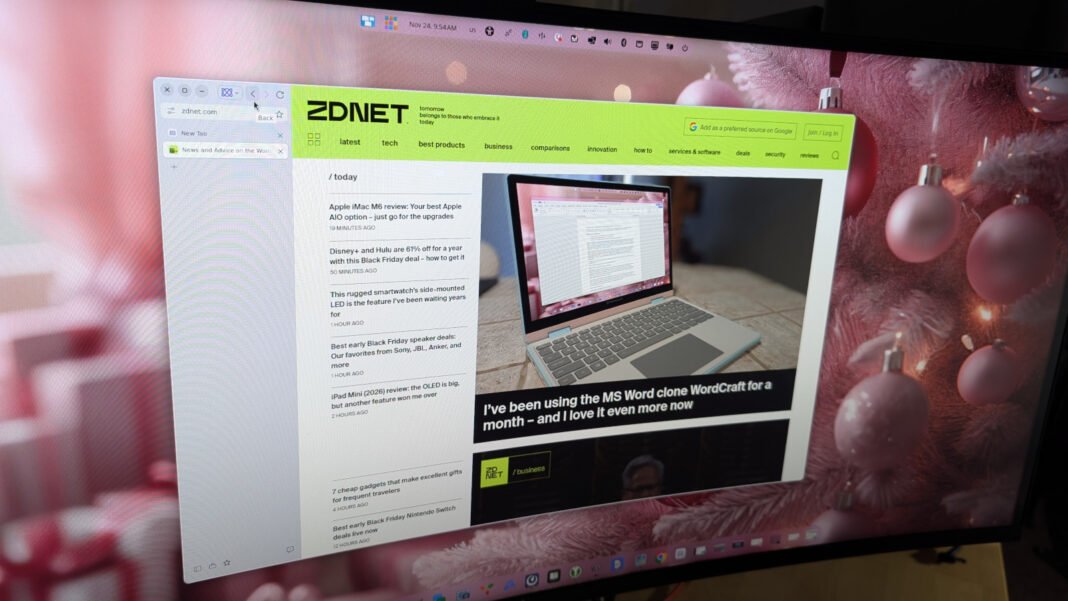
Practical web: Ladybird already shows great promise for a brand new browser
In a web browser landscape dominated by behemoths like Chromium (Google) and WebKit (Apple), the arrival of a newcomer is an extremely rare event. Ladybird, a completely independent browser project, is currently in the news. And for good reason: despite its young age, it already promises to be one of the most promising initiatives of recent years.
A project born from crazy ambition
To understand the interest generated by Ladybird, we must go back to its genesis. Ladybird was originally just a simple HTML rendering tool developed for SerenityOSa retro-looking hobbyist operating system, created by developer Andreas Kling. The initial goal was to have a home-made rendering engine, starting from scratch, without using pre-existing code from Blink (Chrome) or WebKit (Safari).
Faced with the scale of the task and the increasing complexity of the modern web, the team decided to detach Ladybird to make it a full-fledged cross-platform browser (Linux, macOS, and potentially Windows).
Why does Ladybird shake up the codes?
What makes Ladybird unique in the market is its radical philosophy:
Total independence: Unlike 95% of current browsers (Edge, Brave, Vivaldi, Opera…), Ladybird does not use Google’s Blink engine. It has its own rendering engine and software stack. It’s a breath of fresh air for the diversity of the web, which suffers from Google’s virtual monopoly on internet standards.
Written in modern C++: The project emphasizes security and performance, relying on modern development practices.
Crowdfunding and community funding: Ladybird is developed in open-source, supported by donations and a very active community of enthusiasts. It is not subject to any commercial, advertising or monetization pressure on personal data.
Impressive start but still a long way to go
The latest tests carried out by observers, notably relayed by ZDNETunderline the dazzling progress of the browser. Ladybird is now capable of correctly displaying complex sites, handling JavaScript fluidly and offering completely honorable navigation, which is a feat for a rendering engine created from scratch.
However, the creators remain lucid: Ladybird is still in the development phase (alpha). It still lacks many advanced features, the management of certain extensions, and advanced optimizations to compete on a daily basis with the giants of the sector.
Why should we follow Ladybird closely?
While you might not be using Ladybird for everyday surfing tomorrow, its existence is crucial to the future of the Internet. A healthy web needs competition to prevent Google from dictating the rules and standards of what we display on our screens.
Ladybird embodies the rebellious and pioneering spirit of the web of yesteryear, combined with the technical ambition of today. This is a project to follow very closely for all technophiles and defenders of an open web.
Here is a clean, modern, and well-structured HTML version of the content, with fixed character encodings, improved layout tags, and better readability.
Test du navigateur Web Ladybird en version alpha
Le navigateur Ladybird en version alpha. (Ph. Jack Wallen/ZDNET)
Les points à retenir du navigateur Web Ladybird (en version alpha)
Ladybird est un tout nouveau navigateur indépendant.
Encore en version alpha, Ladybird peut être installé sous Linux et macOS.
Ce nouveau navigateur est déjà à la hauteur des autres ténors du marché.
Ladybird est un tout nouveau navigateur Web, entièrement développé à partir de zéro. Il n’est basé ni sur Chromium, ni sur Firefox, ni sur Safari, et son objectif est d’être un outil complet et pratique pour le Web moderne.
Lundi, le président de Ladybird, Andreas Kling, a annoncé que le navigateur entrait en version alpha : « Ladybird est un navigateur doté d’un nouveau moteur. Ce moteur est le nôtre, entièrement développé par nos soins, et non un fork. Le navigateur qui l’entoure est modeste, mais fonctionnel. »
M. Kling a précisé que le canal alpha fonctionnait selon un modèle de « rolling release » (publication continue) et que les développeurs déploieraient régulièrement des mises à jour automatiques. Les utilisateurs n’auront donc plus besoin de compiler le code à chaque nouvelle version : une fois installé, le logiciel se met à jour tout seul.
Détails et contexte technique
Ladybird utilise une architecture multiprocessus pour la gestion du réseau, le décodage des images, la composition et les médias. Les pages provenant de différents sites sont chargées dans des processus de rendu distincts, chacun étant isolé du système hôte dans un bac à sable (sandbox). Le décodage des images et les connexions réseau sont gérés en dehors de ces processus pour mieux bloquer les contenus malveillants. Les développeurs invitent d'ailleurs les chercheurs en sécurité à leur signaler toute vulnérabilité.
Mais Ladybird est bien plus qu'un simple moteur de rendu : c’est une philosophie fondée sur les standards du Web, exempte de conflits d’intérêts, sans accords de recherche par défaut, sans jetons cryptographiques ni aucune autre forme de monétisation agressive. Ladybird renvoie à l’époque où les navigateurs n’étaient que de simples outils pour les utilisateurs, et non des machines à données commerciales.
Le projet bénéficie tout de même de soutiens financiers de la part de sponsors tels que Futo, Shopify, Cloudflare et Proton VPN. Totalement open source, son code est consultable sur son dépôt GitHub officiel et son indépendance juridique est garantie par une licence BSD à deux clauses.
Quid des performances ? Je l’ai installé sur Pop!_OS Linux pour le comparer à mes navigateurs habituels (Firefox et Vivaldi).
Ladybird : premières impressions
Capture d’écran par Jack Wallen/ZDNET
Après une installation rapide via la commande Flatpak (flatpak install --user https://flatpak.ladybird.org/ladybird.flatpakref), I discovered a clean user interface, close to that of Chrome.
From launch, I was able to configure my search engine, element layout, interface color, as well as enable ad blocking and automatic updates. I chose DuckDuckGo, opted for the layout “Everything in the sidebar” (All in the sidebar), selected purple and activated the ad blocker to get an environment to my liking.
My full-scale test with ZDNET
The first site I looked at was ZDNET. It displayed quickly and correctly. Scrolling was smooth and internal links loaded without a single hitch.
I then explored my usual sites to find possible bugs. Result: Facebook works significantly better on Ladybird than on Firefox, without any scrolling problems or display latency.
Screenshot by Jack Wallen/ZDNET
I then put the browser through the Speedtest 3.1 performance test, comparing it to Vivaldi, Chrome and Firefox:
Ladybird – 10.4
Vivaldi – 30.5
Firefox – 29.9
Chromium – 41.8
Unsurprisingly, Ladybird lags behind in raw benchmark score, which makes sense for an alpha release. However, giving little credit to synthetic benchmarks, I preferred to time the actual loading time of the AP News page (after clearing the cache of each browser):
Ladybird – 2.91 seconds
Vivaldi – 2.29 seconds
Firefox – 2.67 seconds
Chrome – 3.24 seconds
A competitor already capable of competing
It's an excellent surprise: Ladybird doesn't bring up the rear and is positioned very close to the podium. Its daily performance is completely comparable to that of its rivals.
What struck me the most was its intuitiveness. Once the interface was adapted to my workflow, nothing disrupted my experience. Let us nevertheless note one detail to be set by default: the browser closed all the tabs when closing. A problem quickly resolved by going to Preferences > Startup and browsing > Restore previous windows and tabs.
What is still missing
At this point, the most notable absence is extensions, which are not yet supported. Personally, this didn't bother me too much (I only missed the Grammarly tool), because it guarantees a light and fast browser. If you are a user dependent on third-party extensions, it is better to wait until Ladybird leaves the alpha phase.
Shredder Smith is the lead curator and digital persona behind topaitools4you.com, an AI directory dedicated to "shredding" through industry hype to identify high-utility software for everyday users. Smith positions himself as a blunt, no-nonsense reviewer who vets thousands of emerging applications to filter out overpriced "wrappers" in favor of tools that offer genuine ROI and practical productivity. The site serves as a watchdog for the AI gold rush, providing categorized rankings and transparent reviews designed to help small businesses and creators navigate the crowded tech landscape without wasting money on low-value tools.