Here is a suggested article for ZDNETwritten in the journalistic, professional and accessible style that characterizes the media.
ExpressVPN Fortify review: fast protection throughout your home
Faced with the proliferation of connected objects and cyber threats at home, ExpressVPN is expanding its offering with Fortify, a router designed to secure the entire home without sacrificing speeds. ZDNET tested it.
Protecting your computer and smartphone has become a reflex for the majority of users. But what about your smart TV, your games console, your connected thermostat or your voice assistant? These devices, often forgotten, nevertheless constitute ideal entry points for hackers. To meet this challenge, VPN solutions at the router level are multiplying.
A pioneer in the sector, ExpressVPN takes a new step with Fortifya Wi-Fi router designed to simplify access to comprehensive protection. Promise: simplified installation, enhanced security and, above all, performance on par with current fiber connections. Bet held? ZDNET took a look at the device.
A discreet design and finally accessible installation
Historically, installing a VPN on a router was an obstacle course. You usually had to download complex configuration files, navigate to arcane interfaces, and cross your fingers that throughput wouldn’t plummet.
With Fortify, ExpressVPN takes the complete opposite approach. The case adopts a sober, cubic and modern design, which will not look out of place in a living room. But it is above all the configuration that impresses: thanks to the dedicated mobile application, installation is done in a few minutes. We plug the router into the ISP box, scan a QR code, and that’s it.
The management interface makes it easy to segment your network. For example, you can assign a permanent VPN to your work computer, disable protection for your games console to preserve your ping, or even create a secure guest network in one click.
Stunning performance: the flow trap avoided
This is traditionally the downside of router-based VPNs: the device’s processor runs out of steam when encrypting data, irreparably blocking the connection of the entire house.
For its Fortify, ExpressVPN has obviously gone all out on the internal hardware. Equipped with a powerful processor and compatible with the latest Wi-Fi standards, the router takes it all in stride. During our tests on a gigabit fiber line, the drop in speed observed once the VPN was activated on the entire network was less than 10%. In practice, simultaneous 4K streaming on two televisions, teleworking by videoconference and heavy downloads are done without the slightest slowdown. Latency (ping), crucial for online players, also remains very stable.
Security and privacy: a digital fortress
Beyond IP address masking and traffic encryption (via the fast and battery-efficient Lightway protocol for connected devices), Fortify integrates advanced security features directly at the network level:
- Blocking trackers and ads: A native DNS filter blocks ad networks and cookies before they even reach your screens.
- Smart Parental Control: Ideal for families, it allows you to block access to certain adult content or schedule Internet cuts for children’s devices at bedtime.
- Protection against malware: The router blocks access to sites known to distribute malware or conduct phishing campaigns.
ZDNET’s opinion
With FortifyExpressVPN successfully makes the transition from individual VPN to home VPN. No more hassle of manual configuration: the brand offers here a turnkey product, extremely effective, which protects every corner of the smart home without penalizing the performance of the fiber.
Although it represents an investment (combining the purchase of hardware and the subscription to the VPN service), it is clearly aimed at those who take their cybersecurity seriously and want transparent, permanent and invisible protection for all members of the household. For families, telecommuters and techies, it’s one of the best solutions on the market today.
Source: ZDNET
Here is a rewritten, fluid and professional version of the article, optimized for reading on the web while retaining all of the original information.
ExpressVPN Fortify router review: is overall home security taking a step forward?
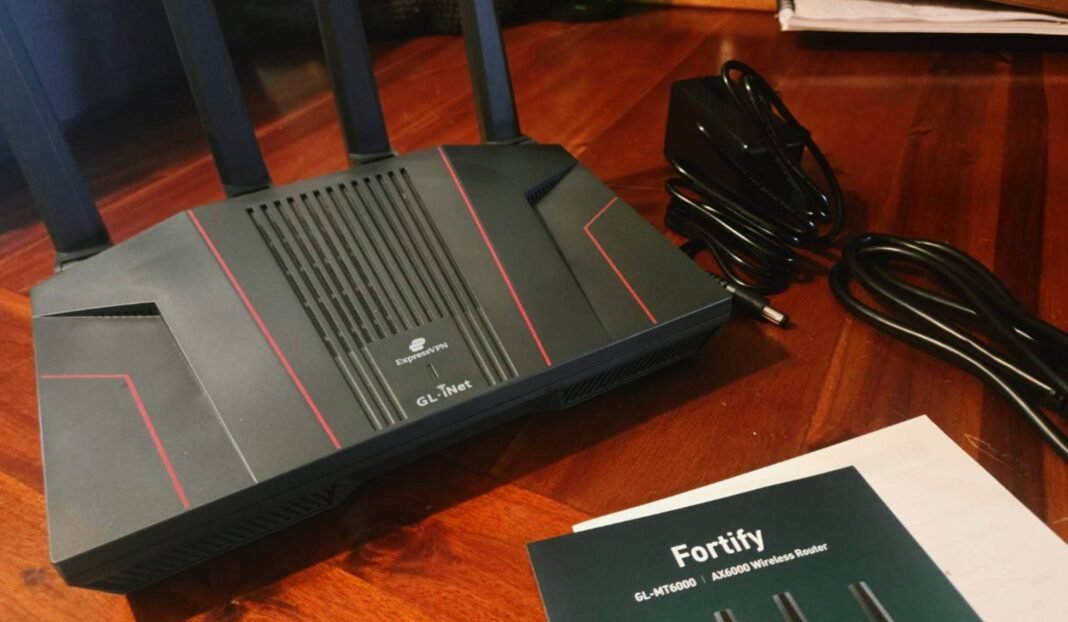
The ExpressVPN Fortify router, Ph. Charlie Osborne / ZDNet.
If you use a virtual private network (VPN), you’ve probably already heard of VPN-enabled routers. These specialized devices create an encrypted tunnel to hide your online activity, thwart interception attempts, and disguise your true geographic location by assigning you the IP address of a remote server.
After removing its first models from sale (the Aircove And Aircove Go), ExpressVPN returns to the market with the Fortify. This new generation is based on the platform Flint 2 of GL.iNet, more efficient. Although not a completely new hardware creation, this transition future-proofs, with older Aircove models only benefiting from a few years of security updates.
Note: If you already have an Aircove or Aircove Go, ExpressVPN customer service offers a discount code for the purchase of the new Fortify.
So, does this Fortify router live up to its promises? I tested it. Here is my verdict.
The strengths and weaknesses of the ExpressVPN Fortify router
The pluses:
- User-friendly interface and easy to get started
- Elegant and neat design
- Excellent connection speeds
- Quick installation
Cons:
- Exclusive lock on ExpressVPN service
- Hardware almost identical to GL.iNet’s Flint 2
On the budget side, a classic VPN subscription costs a few euros per month, while a VPN router represents a larger initial investment (to which is added the recurring subscription).
The good news is that Fortify includes an “Advanced” ExpressVPN plan for 12 months when purchasing the router. This includes standard VPN, password manager ExpressKeysan ad and tracker blocker, parental controls, and email privacy service ExpressMailGuard.
Technical characteristics
- Wi-Fi 6 AX6000 max. : up to 1148 Mbps (2.4 GHz) + 4804 Mbps (5 GHz)
- MU-MIMO technology : 4×4 (compared to 2×2 on the Aircove)
- Processor : Quad-core at 2.0 GHz
- Memory and storage : 1 GB DDR4 RAM and 8 GB eMMC storage
- Wired connectivity : 2 2.5 Gigabit Ethernet ports and 4 Gigabit Ethernet ports
- Ability : Simultaneous support for 86 devices
- VPN speeds : Up to 900 Mbps under WireGuard® (compared to 330 Mbps for Aircove)
- Advanced Features : Multi-WAN failover, intelligent queue management (anti-latency), AdGuard Home support (network-level ad blocking) and GL.iNet platform.
Unpacking and installation
In the box you will find the router, an Ethernet cable, the power adapter and the quick start guide. Lightweight, with a matte black finish accented with red stripes and angular lines, the Fortify sports a modern and discreet look. Its four fixed antennas at the back can be folded flat according to your needs.
The rear of the device integrates the classic connectors: 12 V power jack, 2.5 GbE ports, Gigabit LAN ports, as well as a clearly visible physical reset button (gone are the days when you had to look for a pin to restart your router).
Initial setup
- Plug in power and connect the router to your modem via an Ethernet cable.
- Connect to the default Wi-Fi network (shown under the device, such as “Fortify-XXX”) or via cable.
- Go to the address http://192.168.8.1/ to launch the configuration wizard.
There you can define your administrator password, rename your Wi-Fi networks (2.4 GHz and 5 GHz) and choose the router’s operating mode: classic router, Wi-Fi repeater to extend your existing coverage, or connection sharing via a smartphone via USB.
Enable VPN
To take advantage of your free year, go to the “VPN Client” profile on the dashboard. Follow the instructions, use your voucher on the dedicated page, then log in again with your ExpressVPN credentials.
You can configure one or more VPN tunnels. Each of them incorporates a kill switch by default, which instantly cuts off Internet access in the event of an unexpected VPN disconnection, ensuring that no clear data is leaked.
Performance and speed tests
Once configured, the Fortify was perfectly stable. The different VPN servers tested responded without the slightest hitch.
What about the impact on speed? Typically, a VPN incurs a 5% to 35% loss due to encryption. As ExpressVPN is one of the fastest on the market, the results at home have been excellent:
- Original speed (without VPN) : 579.5 Mbps download / 103.5 Mbps upload
- Active ExpressVPN app : 555 Mbps download / 101 Mbps upload
- Active Fortify VPN (Smart Location) : 512 Mbps download / 108 Mbps upload
A Hardware Caution
If Fortify greatly outperforms the old Aircove (multiplied speeds and VPN performance), there is an important detail to know: hardware is identical to GL.iNet Flint 2 (reference GL-MT6000).
Sold for around €212 under the ExpressVPN brand compared to €166 for the original GL.iNet model, you pay here for a slightly reworked design, tailor-made software integration and the one-year subscription included. The Fortify is the result of a commercial partnership: a very correct choice, even if it does not integrate the latest cutting-edge standards such as Wi-Fi 7 (present on the Flint 4).
Review: Should you go for ExpressVPN Fortify?
Fortify is primarily aimed at current ExpressVPN customers who own an Aircove, or new users planning a commitment of several years.
Although it is physically a “rebranding” of the Flint 2, the device fits nicely into an interior and offers an ideal dashboard to manage the protection of all your home devices with ease. If you are looking for a turnkey solution, fast and backed by a large network of servers, this is a very good product. Just don’t expect a technological revolution at the component level.
What happens to Aircove and Aircove Go routers?
If you are still using an Aircove, rest assured: security updates and technical support will continue to be provided until 2027 (for the Aircove) and 2028 (for Aircove Go). However, as these models are at the end of their life, their purchase is no longer recommended today.
Comparison table: Aircove vs Fortify
| Features | Old Aircove | New Fortify |
|---|---|---|
| Wi-Fi | Wi-Fi 6 AX1800 | Wi-Fi 6 AX6000 |
| Max Wi-Fi Speed | 600 Mbps (2.4 GHz) + 1200 Mbps (5 GHz) | 1,148 Mbps (2.4 GHz) + 4,804 Mbps (5 GHz) |
| MU-MIMO | 2×2 | 4×4 |
| Processor | Old |