This is an article written in ZDNET’s professional and accessible style.
Convenient Android: New version of Pixel Weather app lets you report different conditions in your area
Google is rolling out a nifty update for its Weather app exclusive to Pixel smartphones. Now users can adjust forecasts in real time to improve local accuracy.
By the ZDNET editorial staff
Published on [Date du jour]
Weather apps may rely on cutting-edge algorithms and sophisticated forecasting models, but they sometimes get it wrong. Who hasn’t one day taken out their umbrella under the bright sun, or the other way around? To correct the situation, Google is banking on collective intelligence.
With the deployment of a new update of its application Pixel Weatherthe tech giant is introducing a highly anticipated participatory feature: the ability to report local weather conditions different from those displayed on your screen.
A more human and more local weather
Jus Present, the Google Pixel Weather application simply relayed standardized data for your geographic position. But on the scale of a city, or even a neighborhood, the weather can radically change.
Thanks to this new feature, spotted in the latest versions of the application, users can now interact directly with the forecasts. If the application announces heavy rain in your area even though the sky is perfectly clear, a simple report will allow the information to be relayed.
How does it work?
Concretely, the application interface is enriched with a new interactive option.
- Open the app Weather report on your Pixel.
- If the conditions displayed do not correspond to reality, a prompt or a dedicated button (usually located under the summary of current conditions) offers you to report the weather.
- You can then indicate the actual state of the sky (sunny, rainy, snowy, foggy, etc.).
This anonymized data is then aggregated by Google. The objective is twofold: refine micro-scale forecasts using the principle of crowdsourcing (participatory production) and improve the learning of the company’s weather models.
Why is it important?
This approach recalls the success of navigation applications like Waze (owned by Google), which owes its reliability largely to real-time reports from its community (accidents, speed cameras, slowdowns).
By transposing this model to weather, Google hopes to solve one of the biggest challenges for forecasters: hyper-locality. The weather changes quickly, and who is better placed than the person with their nose out the window to tell it?
Availability
This new feature is being rolled out gradually via a server-side update and an app update on the Google Play Store. It currently concerns smartphones Google Pixel compatible with the redesign of the weather application (Pixel 6 and recent, as well as the Pixel Fold).
If you don’t see the option appear on your device yet, be sure to update your app through the Play Store and wait a few days, as Google’s rollout usually happens in phases.
Here is a rewritten, fluid and modern version of the content, ready to be published on a website or blog. The HTML code has been cleaned and transformed into a structured and pleasant to read format.
Google Pixel: the Métou application integrates a collaborative function to correct forecasts
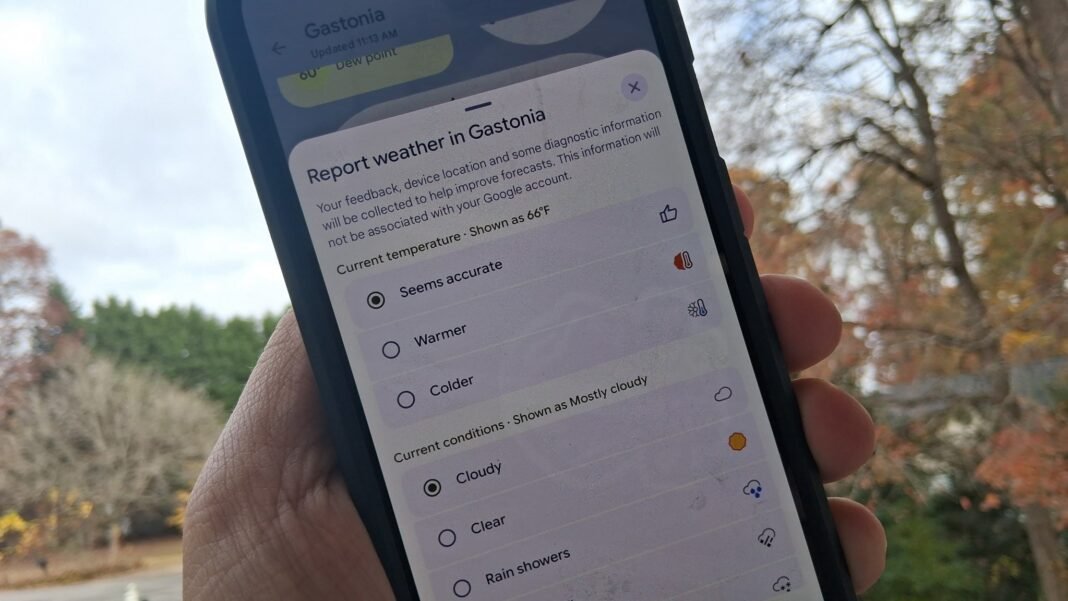
The Weather application on Google Pixel smartphones now includes a feature to report the weather in real time. — Photo: Artie Beaty / ZDNET
What to remember:
- A new participatory option: The Google Pixel Weather app offers a sheet dedicated to user feedback.
- Correct real time: It is now possible to report errors in temperature or local weather conditions.
- Improve the algorithm: Google relies on these field reports to refine its future forecasts.
Native weather apps often suffer from a lack of accuracy. To remedy this, Google is changing strategy by transforming its users into climate observers.
A recent update to the Weather app on Pixel smartphones introduces a new map called “Report current weather”. If the time displayed on your screen does not correspond to the reality in your street, you can now let us know in a few clicks.
How to report local weather on your Pixel?
At the bottom of the Weather app home page, a new section invites you to “share current weather conditions to improve local forecasts.”
By clicking on it, several options are available to you:
- Adjust the temperature: Indicate whether the thermometer is accurate, higher or lower than the app claims.
- Specify the conditions: Select the state of the sky from different choices (Cloudy, Clear, Showers, Heavy thunderstorms, etc.).
Google assures that this feedback, combined with the location of your device and diagnostic data, is used exclusively to improve the reliability of the forecast models. In addition, these reports remain completely anonymous and are not linked to your Google account.
Why do weather apps get it wrong so often?
The unreliability of weather apps is a chronic problem. Largely automated, they sorely lack human analysis. A computer algorithm often has difficulty grasping the micro-climatic subtleties of a locality, where a meteorologist or field observation makes all the difference. Allowing users to contribute is therefore an essential step to regaining their trust.
An initiative that aligns with the competition
With this new feature, Google is following in the footsteps of Apple, whose Weather application already includes a similar function. On the other hand, this option is still conspicuous by its absence on the native interfaces of Samsung or other Android manufacturers.
As for third-party applications, Weather Underground has long offered a participatory reporting system, powered in particular by a vast network of connected domestic weather stations.
The good news is that this feature already seems to be widely deployed: it is currently active on all of the Pixel smartphones in our editorial team. The deployment therefore promises to be widespread.
Source: Adapted from ZDNET.com