Key points to remember according to ZDNET
- You can install Claude artifacts as desktop apps, but these will require a Wi-Fi connection.
- Use caution when granting “artifact” applications full access to your computer.
- Claude, which is already a work tool in its own right, gives birth to even more work tools.
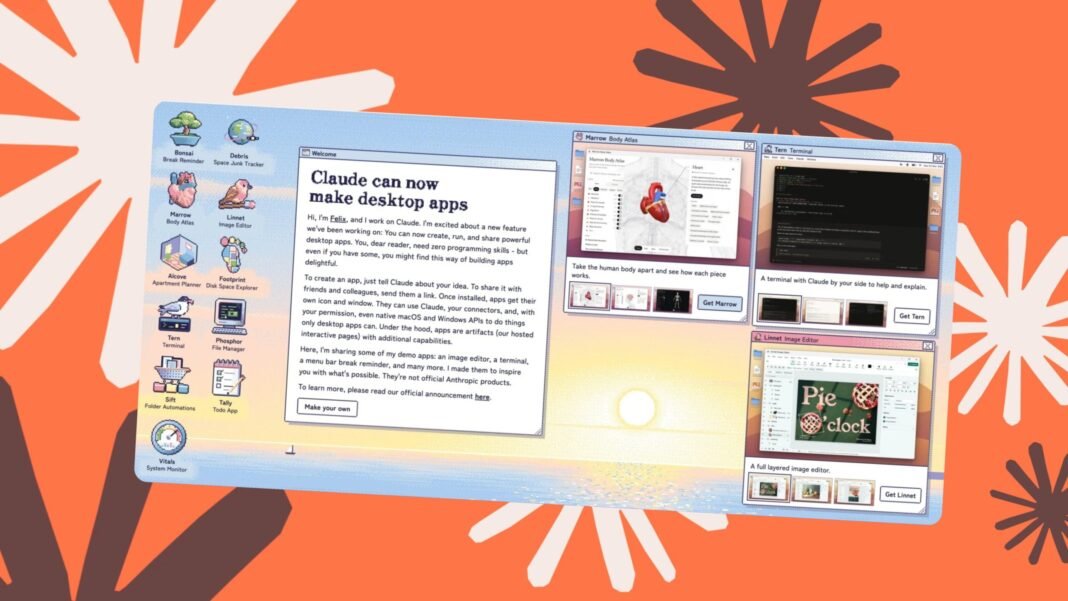
Anthropic makes its Claude artifacts available as desktop applications, making it easier for you to share and access your most recurring tasks on your computer. The “Install as app” feature is available in beta for all Claude subscriptions, free or paid, and works on both Mac and Windows, but not on Linux.
Anthropic first launched artifacts in 2024. Since then, they have become a way to standardize and repeat tasks that users perform regularly, especially at work.
Previously, artifacts were executed via the Claude window or in a browser. By separating them as separate desktop applications, you can now run different Claude queries while using your artifacts locally, or use these applications without opening Claude at all.
“Artifacts” applications can still access Claude
“When an artifact is installed as a Mac or Windows application, it has its own icon and opens in a dedicated window rather than within Claude. You can share it with other people, and it needs your permission before it can interact with your computer,” Anthropic said.
Artifacts apps can still access Claude and any connectors you use. And they update automatically when you edit the “Artifact” itself in Claude. However, when apps send a request to Claude, this is counted against your Claude usage limits, which are the lowest for free users.
Anthropic said the feature aims to simplify app development for both developers and non-developers.
Claude is more of an AI-powered business suite than a simple chatbot
This update clarifies the direction professional AI software is taking. For many organizations, Claude is already more of an AI-powered business suite than just a useful chatbot.
Clearly, users use tools like artifacts often enough — and use them concurrently with other Claude features — that they need these Claude-based tools to function as standalone software.
“If you rely on a tool for your work, it should open like the rest of your applications and notify you when an action requires your attention,” Anthropic said.
What are the limits of Claude’s “artifacts” applications?
However, Claude’s “artifact” applications do not have the same functionality as those you could create using Claude Code.
Although you don’t need to have Claude open for these apps to work, you will still need to be logged in to Claude and have Internet access. They are therefore not a fully portable or off-grid option.
The support page for this feature also clarifies that legacy artifacts, “Claude Cowork active artifacts,” and artifacts generated from templates such as Docs, Slides, and Sheets cannot be installed as desktop applications.
How to Install Claude Artifacts as Desktop Apps on Mac and Windows
First, make sure Claude for Mac or Windows is up to date.
You can try the “Install as app” feature, available in beta for all free and paid plans, via Claude’s Share menu.
Select the “Install as app” option; The artifact you chose will then be downloaded to your desktop. From there, set the permissions as needed.
- Open the artifact you want to install in Claude.
- Open Claude’s “Share” menu.
- Select the “Install as app” option; The artifact you chose will then be downloaded to your desktop.
- Set permissions as needed.
How to manage Claude artifact app permissions
Permissions range from default permissions (those in effect in a browser) to application-specific permissions, such as sending notifications and full computer access.
Full access to the computer means the artifact application can “run programs and read, modify or delete your files without asking for your consent each time,” Anthropic says. So proceed with caution.
Every time you modify and update the artifact (and therefore the application), Claude will ask you to confirm the permissions again. This will ideally provide you with regular checkpoints to reassess access. However, some security measures are in place: Anthropic only allows you to grant full computer access to applications that you have created yourself. For Team and Enterprise plans, this extends to all applications created by your colleagues.
“Anthropic does not verify applications before you install them; so only grant full access to applications you trust,” the company says.
For Claude Enterprise plans, the “Install as app” functionality is completely disabled until an administrator activates it in the organization settings.
Source: “ZDNet.com”