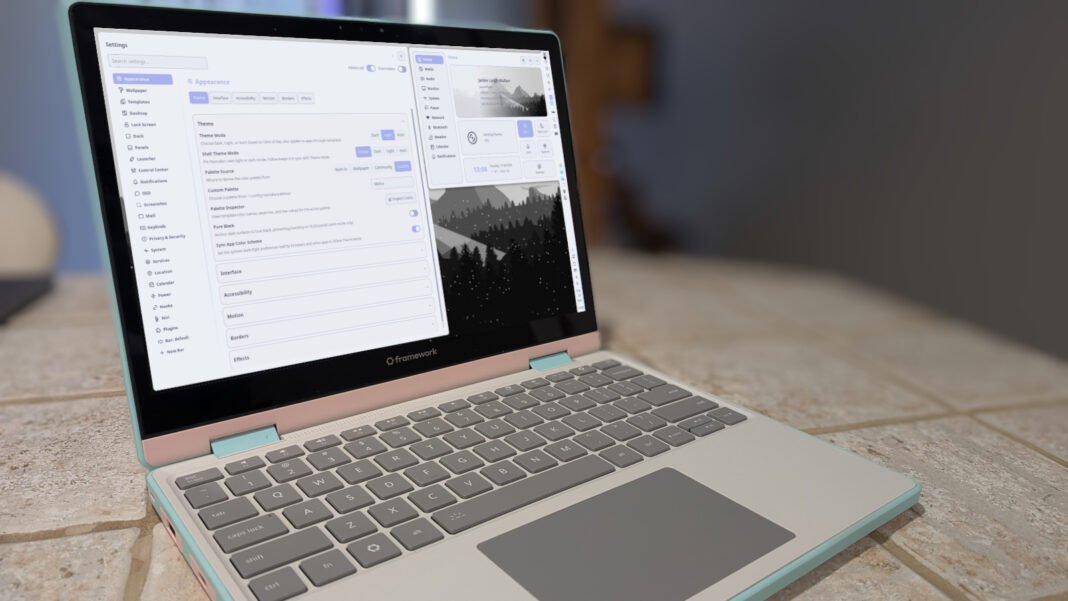
KaOS Linux distribution 2026.11, Ph. Jack Wallen/ZDNET.
Key points to remember about KaOS Linux 2026.11
- KaOS 2026.11 shows exceptional performance even on older PCs.
- KaOS replaced KDE Plasma with Niri and Noctalia.
- You can download and install KaOS for free.
KaOS 2026.11 is a free, systemd-free Linux distribution that allows it to have exceptional desktop performance even on older computers with as little as 2 GB of RAM. I recently wrote an article about KaOS Linux moving away from KDE Plasma as its default desktop environment. At the time, KaOS had kept KDE Plasma in its repositories, which allowed users, if they wanted, to install that more familiar KDE Plasma desktop environment.
However, in a recent turnaround, the KaOS team decided to remove KDE Plasma from the repositories, making the “K” in KaOS redundant.
With KDE Plasma no longer an option, does the distribution still live up to its previous versions? Let’s take a closer look.
What is Niri window manager?
For those who have never heard of Niri, it is a lightweight tiling window manager that takes a very different approach to window management. Instead of the traditional tiled window manager approach of placing apps in the most logical and convenient location on the screen (which can lead to smaller and smaller windows as more apps are opened), Niri opts for an infinite horizontal strip on which content can be scrolled.

Jack Wallen/ZDNET
This is how Niri works:
- Open an application, it will be displayed in the center of the screen.
- Open a second application, it will be displayed directly to the right of the first.
- Open a third application, it will appear directly to the right of the second.
This pattern continues as you open more apps, each opening to the right of the previous one. As each app opens, you can swipe it right or left (via the title bar) to scroll through the strip. Find the app you want and use it. Niri offers a very elegant solution to multitasking: it is simple to use and fast.
But what has changed in KaOS (besides removing KDE Plasma from the repositories) since my last review? This new version, 2026.11, has just been released, and the changes are subtle but important.
What’s new in KaOS 2026.11?
The first thing I noticed is that KaOS now uses Noctalia, a native Wayland desktop shell. This shell provides the desktop layer for the Wayland composer, a layer that includes title bars, application launcher, notifications, lock screen, and wallpaper.
There is only one reason why KaOS moved to Noctalia (which also explains why the developers removed KDE Plasma from the repositories). KaOS having abandoned systemd as an initialization system, it was necessary to use a new window shell. It’s not that KDE Plasma’s KWin window manager requires systemd, but since KDE Plasma actually uses systemd to manage KWin, the choice was obvious.
You also have a plethora of settings to explore, so much so that it can seem a little confusing.

Jack Wallen/ZDNET
Noctalia v5 builds on Wayland and OpenGL ES
Noctalia v5 builds directly on Wayland and OpenGL ES, and the end result is much faster and smoother than I had previously experienced with KaOS. For me, this is the big change, because the speed of KaOS 2026.11 far exceeds that of the last version I tested. Animations are exceptionally smooth, and there’s absolutely no frame tearing or jerking when dragging the application bar from side to side. It’s a fluidity worthy of macOS, and I totally agree.
Another change in KaOS 2026.11 concerns the display manager, which is now greetd (with tuigreet). The greetd display manager integrates with seatd (a session management daemon for Linux that manages access to shared devices). In addition to tuigreet (which is a console mode welcome screen), KaOS also offers the possibility of using noctalia-greeter, which is based on greetd but includes a graphical interface. The only caveat: noctalia-greeter is not quite as comprehensive as tuigreet, so use it at your own discretion.
A few new packages have also been added to the list, including dex (which provides full XDG autostart support for a non-systemd system), kss (a KConfig module application for adjusting settings for KDE applications), Zig and libghostty (to allow preview testing of KDE Plasma’s new GPU-aware terminal emulator, kwi), and Croeso (the new integration application). The android-tools package has been reinstated.
More good news: KDE applications are still available for installation from the KaOS repositories, even without KDE Plasma. I tested this hypothesis by installing KMail, which worked perfectly.
How is KaOS 2026.11 performing?
As I mentioned, these changes were necessary because KaOS remains a systemd-less distribution, and it doesn’t really work well with the latest versions of KDE Plasma. For users, this is important because KaOS now feels right at home on a desktop.
It works incredibly well, feels rock solid, and dramatically improves multitasking with a simple workflow that will make you wonder why no one thought of it before (thanks, Niri).
But above all (for me), the new version of KaOS runs extremely smoothly. I’ve used other distributions with Niri (like Pond), and none of them can match the performance and smoothness of KaOS. In my eyes, KaOS dethrones all lightweight Linux distributions to establish itself as the best option for older machines.
What are the system requirements for KaOS?
To run KaOS, all you need is a 64-bit x86 processor and 2 GB of RAM (4 GB being the recommended minimum). It’s a trifle at the moment.
To be fair, I installed KaOS on a desktop with an Intel Core Ultra 9 processor and 32GB of RAM, but I’ve also tested this OS on machines with as little as 3GB of RAM and only two CPU cores, and it still holds up.
If you are looking for a Linux distribution without systemd, with a unique user interface and with exceptional performance, don’t miss KaOS 2026.11. You can download the ISO image for free from the official KaOS download site.
Source: “ZDNet.com”